Automate customer follow-up after a consultation: a 5-step workflow
Prospects go quiet after a consultation? A 5-step workflow keeps in touch on a steady rhythm, so your team doesn't have to remember every single lead.
The NEXT OS teamNEXT GROUP
- Published
- Read
- 4 min
Contents
- Why prospects go cold after a consultation
- Step 1: Log the consultation outcome in your CRM
- Step 2: Send a recap and documents within 1 hour
- Step 3: Follow up on a 1–3–7 day rhythm
- Step 4: Let AI answer questions after hours
- Step 5: Measure and adjust every month
- Three common mistakes
- Frequently asked questions
A prospect who goes quiet after a consultation hasn’t necessarily said no. Usually they got busy, forgot, and then someone else messaged them first. The way to stay in touch without remembering every lead is to turn follow-up into a 5-step workflow that runs on its own: log the outcome, send a recap, follow up on a rhythm, let AI answer after hours, and tune it every month.
Why prospects go cold after a consultation
Right after the consultation is when interest peaks. They’ve just heard the solution and can picture the result. A few days later the picture fades: they remember the number on the quote, but not why they should pick you.
On your side, a consultant usually juggles many prospects at once. Who needs a call-back, which documents were promised, what the prospect was worried about: it all lives in one person’s head or a few scattered notes. When that person takes a day off, the prospect drops out of sight.
The problem is rarely consulting skill. It’s that no one, and nothing, owns the next step.
Step 1: Log the consultation outcome in your CRM
Every automated workflow needs input data. Agree on a “Consultation outcome” card with four required fields:
- Main need: what the prospect wants to solve.
- Interest level: hot, warm or cold.
- Open concerns: price, timing, comparing with others…
- Agreed next step: send documents, second meeting, trial.
The consultant fills it in about a minute, right after the meeting. Once saved, move the prospect to the “Consulted” stage on the pipeline. That stage change triggers everything that follows, so nobody has to remember anything else.
Step 2: Send a recap and documents within 1 hour
The first message should arrive within an hour, while the conversation is still fresh. It has three parts:
- Thank them and restate the need they described.
- The documents you promised: quote, schedule, company profile.
- One concrete invitation for the next step: see a template, book a second meeting, start a trial.
Use personalization fields from the step-1 card so the message doesn’t read like a broadcast. For example (illustrative name): “Hi Hang, here is the 6-month package quote you asked about, with the 3-installment option. Shall I hold Thursday afternoon for our second meeting?”
Step 3: Follow up on a 1–3–7 day rhythm
After the first message, prospects usually need a few more touchpoints before deciding. A 1–3–7 day rhythm is frequent enough that they don’t forget and spaced enough that they don’t feel chased. Each touchpoint uses a different channel and goal:
| When | Channel | Content | Goal |
|---|---|---|---|
| After 1 hour | Zalo | Recap, documents, next-step invitation | They remember what was said |
| Day 1 | Zalo | Answer the exact concern they raised | Remove the reason to hesitate |
| Day 3 | A story of a customer in a similar situation | Build trust | |
| Day 7 | Phone call | The owner calls to check in | Close or reschedule |
Most important is the stop condition: when the prospect replies, pays or says they’re not interested, the workflow must stop immediately. Nothing annoys a customer more than a sales message arriving after they’ve already signed up.
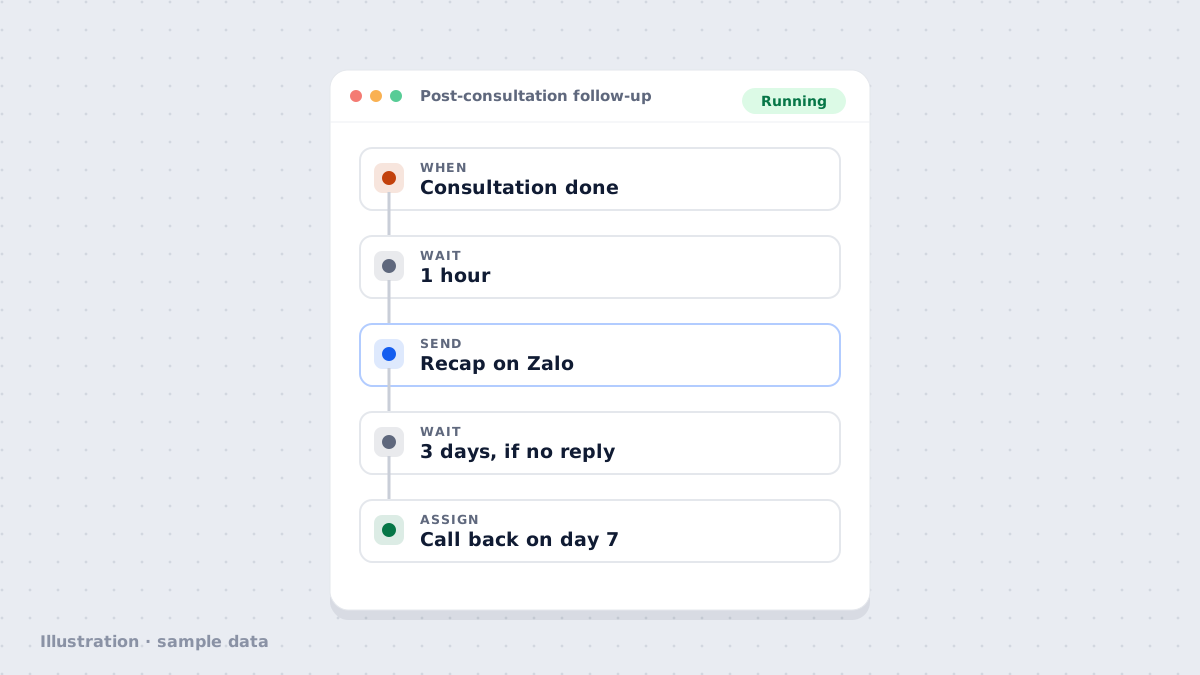
Workflow · Post-consultation follow-upRunning
- WhenStage changes to "Consulted"
- Wait1 hour
- SendZalo message: recap + documents
- Wait3 days, if no reply yet
- SendEmail: customer story
- AssignOwner calls back on day 7
- StopWhen the prospect replies or pays
Sample data
Step 4: Let AI answer questions after hours
Prospects often reread documents in the evening and ask follow-up questions right when your team has gone home. Questions about schedules, prices and return policies already have answers in your documents, so an AI Employee can reply right away and hand the deeper questions to a person the next morning.
Every AI reply is saved in the prospect’s conversation history, so the consultant can see what they asked and what they’re worried about.
Step 5: Measure and adjust every month
A good workflow doesn’t stand still. At the end of each month, look at three metrics from your own business:
- The share of prospects who reply to the first message.
- How many move to the next stage within 7 days.
- Which message in the sequence gets the most unsubscribes.
Change one thing at a time: rewrite one message, switch one channel or move one timing. Change several at once and you won’t know which one worked.
Three common mistakes
Automation doesn’t replace your consultants. It handles the repetitive part so they can spend their time on the conversations that truly need them.
Frequently asked questions
Does this work for a small business with 1–2 people?
Yes, even more so. With a small team, following up is the first thing that slips. Start with steps 1 and 3 and add the rest once the habit sticks.
Should I follow up on Zalo or by email?
Use Zalo for short messages that need a quick reply, and email for long documents, quotes and customer stories. Ask prospects which channel they prefer during the consultation and note it on their record.
Won't prospects be annoyed by too many messages?
They will if every message is a sales pitch. Each message should carry something useful: a document, an answer, a time slot. The workflow must stop as soon as the prospect replies, pays or says they're no longer interested.
Which NEXT OS plan do I need?
Every plan from Starter up already includes automated follow-up workflows, Zalo integration and AI. Some services such as AI and Zalo ZNS messages are billed by usage; see the Pricing page for details.
Author
The NEXT OS teamNEXT GROUP
The NEXT OS product and onboarding team at NEXT GROUP. Our posts start from workflows we have set up with Vietnamese businesses and follow the exact steps in NEXT OS.
- Automation
- Omnichannel inbox
- Funnels & websites
- CRM